
Overview
Managing facilities and assets is a complex task, requiring businesses to keep track of equipment, schedule maintenance, and handle unexpected issues, all while ensuring minimal downtime. With Zorp's Computerized Maintenance Management System (CMMS), we set out to simplify this process, creating a comprehensive tool that allows businesses to manage their assets, track performance, and carry out preemptive maintenance efficiently.
Identifying the Needs
Facility and asset management often involves juggling multiple tasks -tracking asset uptime, managing work orders, scheduling maintenance, and more. Through user research, we identified that many existing solutions were either too complicated or lacked the necessary features to streamline these tasks effectively.
I began by interviewing facilities managers and operations teams to understand their daily challenges. The feedback was consistent: users needed a system that could not only track assets but also predict and prevent issues before they occurred. They also wanted the ability to monitor work orders and asset performance in real-time, ensuring that nothing slipped through the cracks.
Designing the Solution
With these insights in mind, I started conceptualizing the Zorp CMMS. The design needed to be intuitive enough for everyday use, yet powerful enough to handle the complexities of asset management.
Key Features
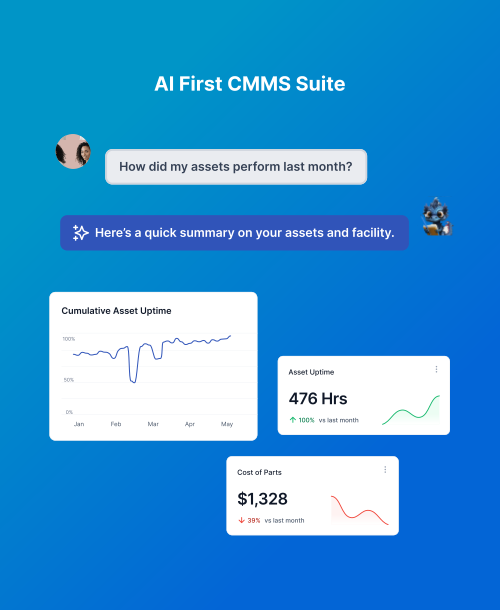
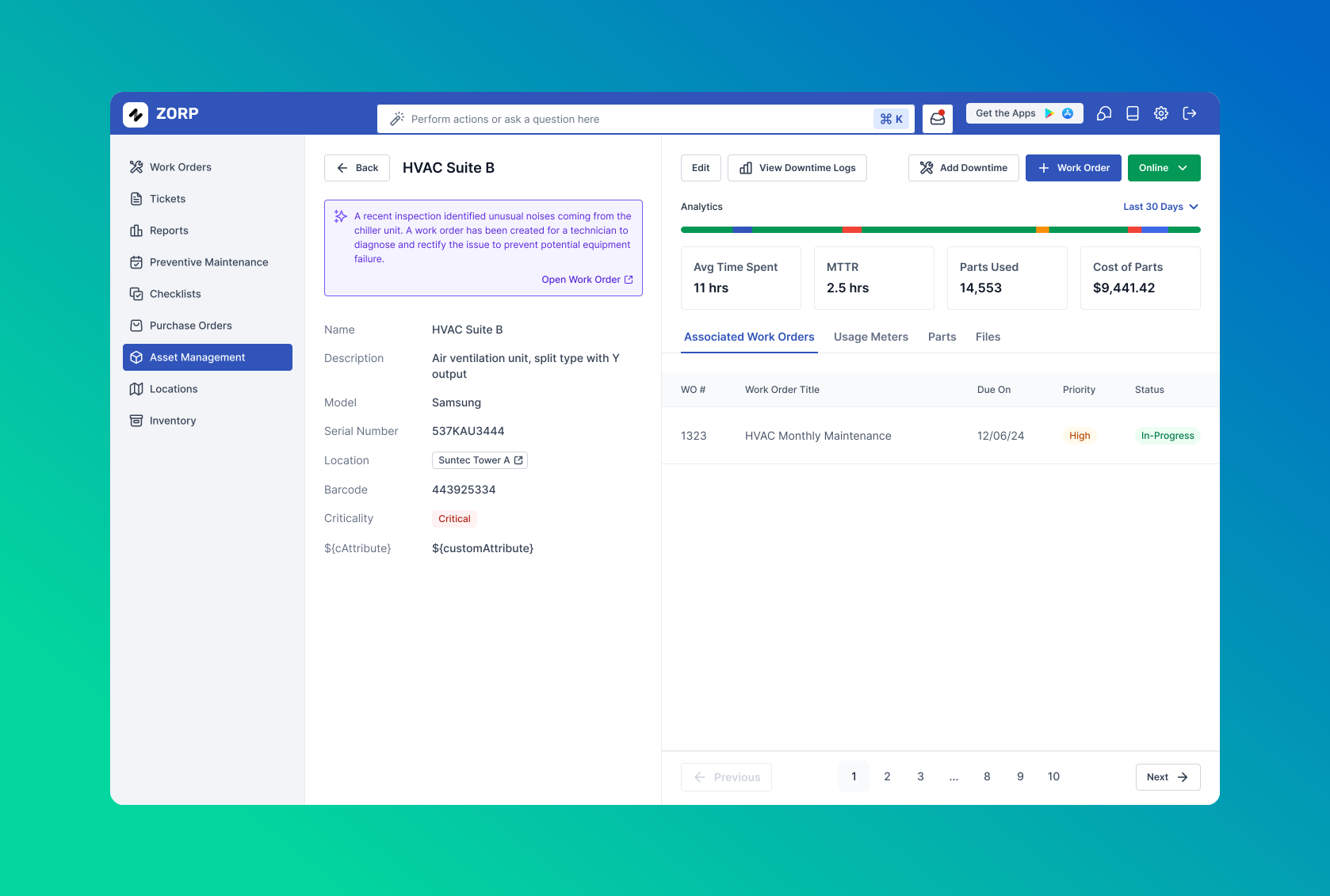
Asset Tracking: Users needed a centralized dashboard where they could view all assets, track their status, and monitor uptime.
Preemptive Maintenance: The system would include tools for scheduling and managing maintenance tasks, helping prevent issues before they escalated.
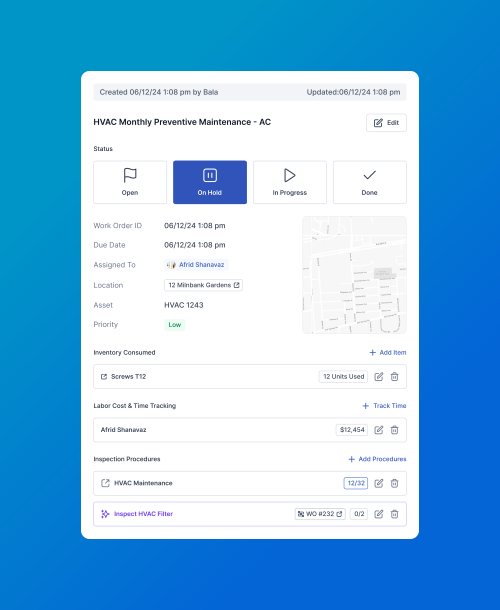
Work Orders: Users would be able to issue, track, and manage work orders efficiently, with real-time updates on progress and completion.
I sketched initial wireframes that visualized these features, focusing on creating a user-friendly interface. The asset tracking dashboard was designed to give users an overview of all assets at a glance, with the ability to dive deeper into specific details as needed.
Prototyping & User Testing
Once the initial designs were in place, I moved on to prototyping. I created interactive prototypes using Figma that showcased the core functionality of Zorp CMMS. These prototypes were tested with potential users to gather feedback on usability and functionality.
During testing, users appreciated the simplicity of the interface but requested additional features:
- Customizable alerts for maintenance tasks
- More detailed reporting capabilities
- Flexibility in work order customization
I took this feedback into account, refining the design to include these enhancements while maintaining the user-friendly nature of the system.
Testing also revealed the importance of flexibility in the work order management system. Users needed to be able to customize work orders to fit their specific processes. To accommodate this, I designed a system that allowed for easy customization of fields, priorities, and workflows.
Bringing the Design to Life
With the final design ready, I worked closely with the development team to bring Zorp CMMS to life. This phase involved regular check-ins and iterations to ensure that the design vision was fully realized in the product. The challenge was to balance the need for a powerful backend with an interface that remained accessible to all users.
One of the key achievements was the successful implementation of the preemptive maintenance feature. This required the integration of data analytics to predict potential issues before they occurred, helping users avoid costly downtime.
Outcome & Impact
The launch of Zorp CMMS marked a significant step forward for businesses relying on efficient facility and asset management.
Results
- Simplified daily operations for facility managers
- Reduced unexpected downtime through preemptive maintenance
- Improved overall asset performance tracking
- Positive post-launch feedback on ease of use
Key Highlights
Target Users
- Facilities managers
- Operations teams
- Asset management professionals
Key Features Designed
- Asset Tracking Dashboard (centralized view, status monitoring, uptime tracking)
- Preemptive Maintenance (scheduling, task management, predictive analytics)
- Work Order Management (issue, track, manage with real-time updates)
- Customizable alerts for maintenance tasks
- Detailed reporting capabilities
Tools Used
- Figma (interactive prototypes)
- User interviews
- Wireframing
- User testing
- Data analytics integration
Reflection
Designing Zorp CMMS was a complex but rewarding challenge. By focusing on user needs and iterating on feedback, we were able to create a system that not only meets but exceeds the expectations of facility managers and operations teams. This project reinforced the importance of a user-centered approach in designing tools for complex tasks, ensuring that even the most powerful features remain accessible and easy to use.